| CONTACT BROWSER DIALOG |
In this dialog you can see the contacts who are currently online and/or add one or more contacts to your ActiveList.
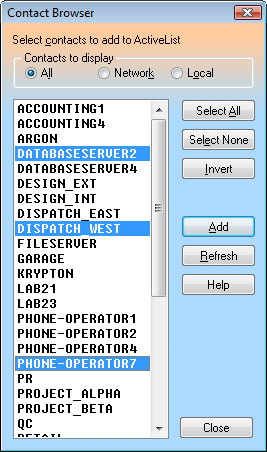
First select the browsing scope you wish to use by clicking the appropriate radio button in the Contacts to display control.
To add the selected contacts to your ActiveList, use the Add button. To refresh network status, click the Refresh button.
| Contacts to display |
| All Displays all online contacts. |
| Network Displays online contacts within your local network. Note that under the Windows Vista (and above) operating system, you will be limited to seeing only the members of your current domain or workgroup. |
| Local Displays online contacts on this machine; e.g. Remote Desktop/Terminal Services clients or other locally logged on users (Fast User Switching). |
| Push buttons |
| Select All Selects all items in the list. |
| Select None Deselects all items in the list. |
| Invert Inverts the current selection of items. |
| Add Adds the selected contact(s) to your ActiveList. |
| Refresh Refreshes the list of available contacts. |
| Help Opens up this Online Help. |